
API Key-Based Authentication
Simplifying Secure Access for Developers
API key-based authentication is a simple yet effective way to authenticate and authorize Login API requests. It involves the use of a unique key (client ID and API key) that acts as a secret token and is provided to the client by the server during the registration or setup phase.
This key is included in the body of every request the client sends to the server. Upon receiving a request, the server validates the API key against a list of known valid keys. If the key is valid, the request is processed; otherwise, it is rejected.
Prerequisites
- You must have a Sandbox Verto account. If you don't have one, refer to Create a sandbox account.
Step 1 - Generate Client ID and API Key
To access your Client ID and API Key, do the following steps:
-
Log in to your Verto sandbox account.
-
Hover the mouse over the icons on the left side of the screen, and select Verto API.
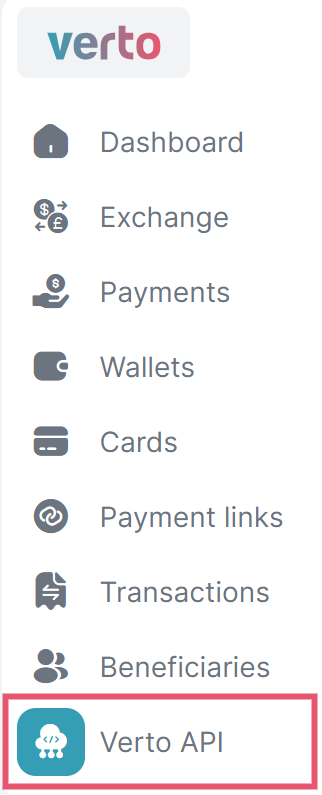 Note
NoteIf you don't see Verto API that means your account is not yet activated to access the APIs. Please send an email to [email protected] or book a meeting here.
-
On the top-right corner, select Generate new api key.
A new screen will appear that ask you to verify your identity.

-
Enter your 6-digit OTP, and select Continue.
Your
Client IdandApi Keywill be generated and displayed on the screen. -
Click on the copy icon and save the
client IDandApi Keysecurely for your reference.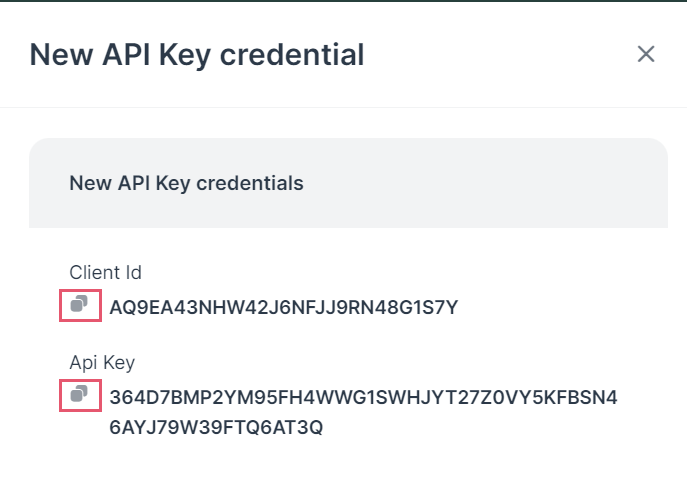 Caution
- If you lost your existing API key or were unable to save it; then you need to generate a new one by following the above steps.
- A maximum of 3 API keys can be generated. If you've reached the limits, delete an existing one to generate a new API key.
-
Select Done to close the pop-up screen.
You can see the generated Client ID on the screen with the staus as
Active.
Step 2 - Enter the required credential
You need to provide the required clientId andapikey along with the mode as apiKey in the request body, as shown below.
This includes the JSON object being sent in the body of the request. It contains:
clientId: The identifier for the client application, which is required for authentication.apiKey: The key that provides permission to access the API, serving as a password.mode: Indicates the authentication method; in this instance, it's set to "apiKey", meaning the server should authenticate the request using the provided API key.
curl --request POST \
--url https://api-v3-sandbox.vertofx.com/users/login \
--header 'accept: application/json' \
--header 'content-type: application/json' \
--data '
{
"clientId": "ACYK8A0FSA4E2YN0BHBEX8JP20NF",
"apiKey": "3E4XZCW50S4BX7M7Q16MJZJDWFXEFN8ZMX77CMM9XBGSF3XC5K1GHCP0",
"mode": "apiKey"
}
'{
"success": true,
"token": "eyJhbGciOiJIUzI1NiIsInR5cCI6IkpXVCJ9.eyJzZXNzaW9uSWQiOiI0NjI1YWVkOC0xMmZmLTIzMmQtZWE0OC0yYWYzMjllMGVjNTEiLCJsb2dpbk1vZGUiOiJhcGlLZXkiLCJpZCI6NTI2LCJjb21wYW55SWQiOjUyNSwicHJvZmlsZUlkIjo1MjYsInVzZXJSZWNvcmRJZCI6MTQ4LCJyb2xlIjoiTk9STUFMX0NMSUVOVCIsInJvbGVOYW1lIjoiTXVsdGkgVXNlciIsInJlZmVyZW5jZSI6IlZVLTI5MTEyMDIyLTE2MS1VMSIsInByb2ZpbGVSZWZlcmVuY2UiOiJWVS0yOTExMjAyMi0xNjEtVTEiLCJjb21wYW55UmVmZXJlbmNlIjoiVlUtMjkxMTIwMjItMTYxIiwiY29tcGFueU5hbWUiOiJIZXlQYXkiLCJyYXRlTGltaXQiOjIwMDAsImlhdCI6MTcyMTEyMDIwNywiZXhwIjoxNzIxMTIzODA3fQ.nLOVQFjQuAOAjKRU5lH49BCjdKaO3OpDOwOImdHCPqg"
}Updated over 1 year ago