
Alternative Remittance Flow
Alternatively, you follow this flow if you don't want to convert everytime you make a payout.
There may be situations where you prefer to keep the conversion separate from payouts and not have them in one flow. This guide would help that flow.
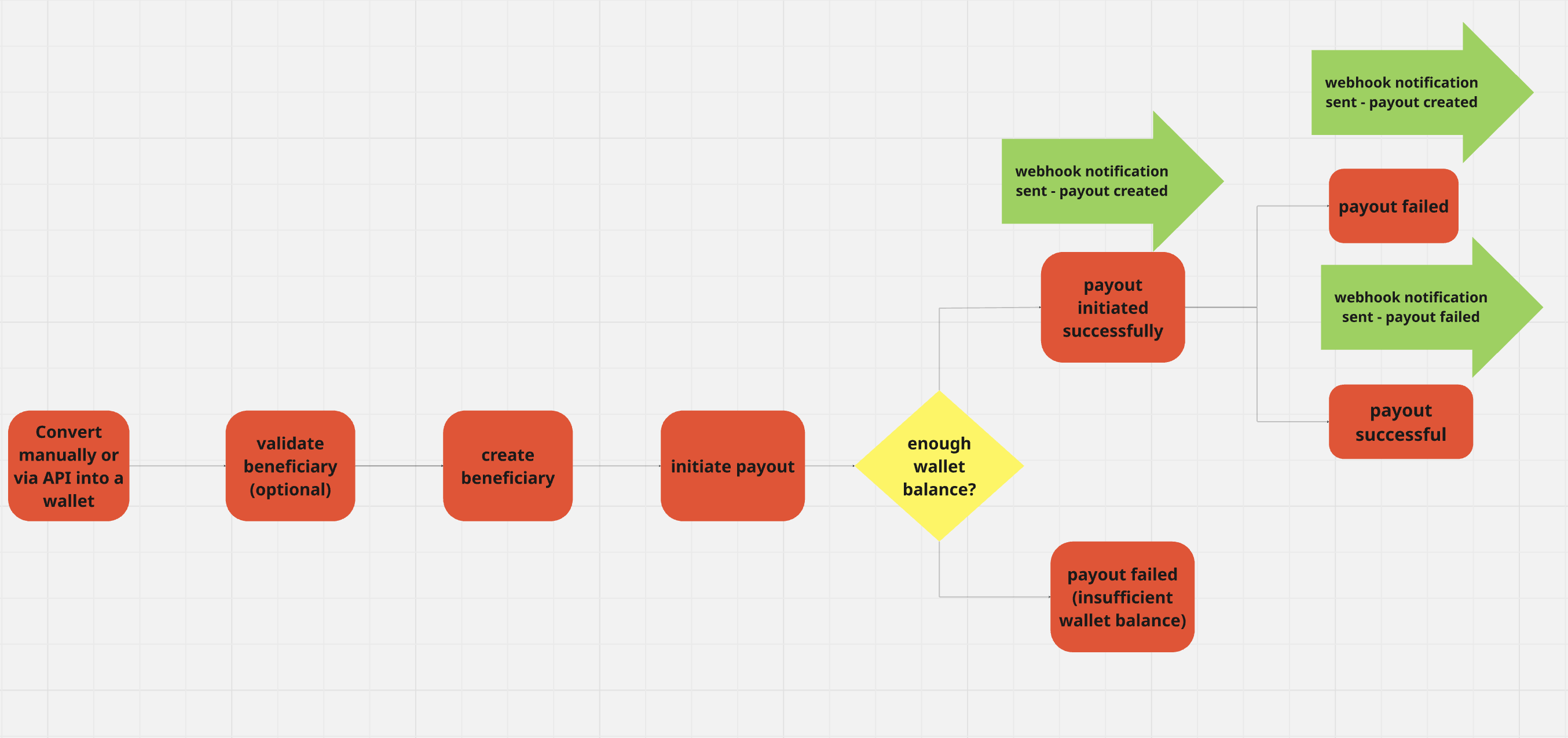
In summary
- Conversion happens via API or manually.
- Verto settles the funds in your wallet, and you intend to use the settled funds for payout.
- Proceed to create a beneficiary.
- Initiate payout from the wallet to a beneficiary.
Only steps 3 and 4 will be explained as they form the payout flow.
Create a beneficiary
Once you have the funds available in your wallet, proceed to create a beneficiary.
Validate account details
Before creating a beneficiary, you might want to validate that the account details you are paying to are correct/valid and confirm to the user that the account belongs to the beneficiary they intend to send to.
You can achieve this by passing the account number and code of the bank they intend to send the funds to the account enquiry endpoint.
//request
{
"bankCountry": "NG",
"bankCode": "000003"
"accountNumber": "4713920010"
}You can confirm if the account is valid if you get a 2XX response. A successful response should return the name of the beneficiary linked to the account. The name of the account can be displayed to the user for confirmation purposes.
//response
{
"bankCountry": "NG",
"bankCode": "000003",
"accountNumber": "4713920010",
"accountName": "TOFINE LOGISTICS SERVICES LIMITED"
}
You can find the list of bank codes for the banks below:
This step is optional, and is only supported for NG beneficiaries for local payouts. Support for KES and TZS bank account/wallet validation will be live in 2026.
Create a beneficiary
After bank account is confirmed, you can proceed to create a beneficiary. The beneficiary id will be used during payout and can be obtained after a beneficiary is created using the create a beneficiary endpoint.
{
"beneficiaryEntityType": "individual",
"accountNumber": "9090961234",
"beneficiaryCountryCode": "NG",
"country": "Nigeria",
"beneficiaryFirstName": "Winning",
"beneficiaryLast": "Winning",
"nationalId": "00123",
"currency": "NGN",
"clientReference": "Test-Bene100"
}Once the beneficiary is created, you will get a beneficiary id that can be used during payout creation.
{
"success": true,
"account": {
"id": 284,
"accountNumber": "9090961234",
"bankName": "PUNJAB NATIONAL BANK",
"beneficiaryAddress": "",
"beneficiaryCity": "",
"beneficiaryFirstName": "Winning",
"beneficiaryLast": "Winning",
"beneficiaryCountryCode": "NG",
"beneficiaryEntityType": "individual",
"country": "Nigeria",
"reference": "RP-09062022-003",
"beneficiaryFirstName": "",
"beneficiaryLastName": "",
"nationalId": "00123",
"currency": "NGN",
"clientReference": "Test-Bene100",
"status": "approved"
}
}
The validity of the account is not checked in this endpoint. We mostly check correct formatting and that the bank code provided is supported.
Create a payout to the beneficiary
To initiate the payout to the beneficiary, you need to specify the wallet id you intend to use (the wallet you intend to debit), the beneficiary (the beneficiary you just created), purpose, paymentId, amount and sender details.
{
"beneficiaryId": 3772,
"purposeId": 12,
"amount": 10000,
"walletId": 3064,
"clientReference": "2F9Dwd123",
"paymentId": "yuu7890"
"sender": {
"country": "NG",
"type": "individual",
"name": "John Suit",
"dob": "1990-03-15",
"customerIdentificationNumber": "45jtjy",
"address Line 1": "house street",
"nationality": "NG",
"address_city": "London",
"origination_country": "US",
"zipCode": "83888"
}
}- Retrieve wallet ID for the wallet to be debited using this endpoint. Ideally, you should be debiting the wallet you converted funds into, and so the wallet is adequately funded. You won’t be able to initiate payment if your wallet isn’t funded (you will get an insufficient funds error). Be sure to confirm your wallet balance using the get wallet details endpoint to ensure your balance is sufficient before initiating the payment.
- The beneficiary ID from the beneficiary you just created in the previous step. The beneficiaryId indicates the individual or company that will receive the funds.
- Purpose ID using this endpoint. You should also make a fetch request to the get purpose codes endpoint to retrieve the purpose code that is appropriate for your payment.
- The sender details are important for compliance reasons and allow us to communicate the ultimate sender to the beneficiary. We require the sender - country, type, name, dob, customerIdentificationNumber, address Line 1, address_city, origination_country and zipCode.
Once the payment is initiated, the status of the payment will be sent via a webhook. The initial status will be requested and will move to completed once we send out the payment.
Once the payment is initiated, the status of the payment will be sent via a webhook. The initial status will be requested and will move to completed once we send out the payment.
//Request
{
"payload": {
"id": 6548,
"amount": "200000.00",
"reference": "TO-22092024-005",
"state": "completed",
"currency": "NGN",
"paymentId": null,
"type": "wallet_to_account",
"clientReference": null,
"account": {
"id": 4369,
"accountNumber": "9079135431",
"bankName": "MONIEPOINT MICROFINANCE BANK",
"beneficiaryAddress": "",
"beneficiaryCity": "",
"beneficiaryCompanyName": "",
"beneficiaryCountryCode": "",
"beneficiaryEntityType": "individual",
"beneficiaryPostcode": "",
"beneficiaryEmail": "",
"country": "Nigeria",
"reference": "RP-19062024-003",
"beneficiaryFirstName": "Daniel",
"beneficiaryLastName": "Torkura",
"nationalId": "090405",
"currency": "NGN",
"clientReference": "",
"status": "approved"
},
"walletId": 2561,
"createdDate": "2024-09-22T14:26:07.000Z",
"completedDate": "2024-09-22T14:26:46.018Z",
"archivedDate": null
}
}//Response
{
"success": true,
"payment": {
"id": 447,
"userId": 4,
"reference": "TO-26072022-002",
"paymentId": "a7600e0e-a973-4d26-b15c-89de5836e900",
"clientReference": "Testing",
"account": {
"id": 278,
"accountNumber": "8311547163",
"bankName": "Community Federal Savings Bank",
"beneficiaryAddress": "89-16 JAMAICA AVENUE",
"beneficiaryCity": "QUEENS",
"beneficiaryCompanyName": "OLSEN INDUSTRIA E COMERCIO SA",
"beneficiaryCountryCode": "US",
"beneficiaryEntityType": "company",
"country": "USA",
"reference": "RP-09062022-004",
"beneficiaryFirstName": "",
"beneficiaryLastName": "",
"nationalId": "CMFGUS33",
"currency": "USD",
"clientReference": null,
"status": "approved"
},
"currency": "USD"
}
}
Please note the following:
- On rare occasions, payments might get held due to compliance reasons. We will reach our with an RFI.
- In cases where you are unable to get a response, you can use this endpoint to check the status of the payout using the paymentId.
Updated 7 months ago