

Webhooks overview
Get real-time notifications for wallet, payment, FX and beneficiary events, and set them up yourself from the Verto platform.
Verto sends webhooks so your systems hear about events such as wallet credits, payment status changes and FX trades as they happen. You don't have to poll for them.
You set webhooks up yourself on the Verto API page of the Verto platform. That's also where you send test events, read delivery logs and retry failed deliveries.
About the screenshotsScreenshots in this guide use sample data (company "Acme Ltd"), so names, URLs and topic names are only examples. The topics available to you are listed in the platform.
Before you start
| Requirement | Details |
|---|---|
| Verto API enabled for your company | Your company must have the Verto API product. Without it the page shows an introduction instead of your workspace. Contact your account manager if you don't see it. |
| Fully verified account | The Verto API is available once your company has completed verification. |
| Verto API access in your role | Read access lets you view subscriptions and logs. Write access also lets you create and edit subscriptions and manage certificates. Admins grant this under Settings → Roles and permissions. |
| A public HTTPS endpoint | A URL on your server that accepts POST requests, e.g. https://your-server.com/webhook. |
No access?If the page says "You don't have access to the Verto API", your role has no API access. Ask a team admin to grant it.
Open the Verto API page
Click Verto API in the left-hand menu of the Verto platform. You can also search for "Webhook subscriptions" in the platform search.
At the top of the page you'll see:
- Summary tiles: Total / Active API keys and Total / Active webhooks.
- Go-live checklist: the steps your integration still needs. Clicking a step takes you to the right tab and opens the matching form. Each step has a Docs link.
- Tabs: API credentials, API certificates, Webhook certificates and Webhook subscriptions.
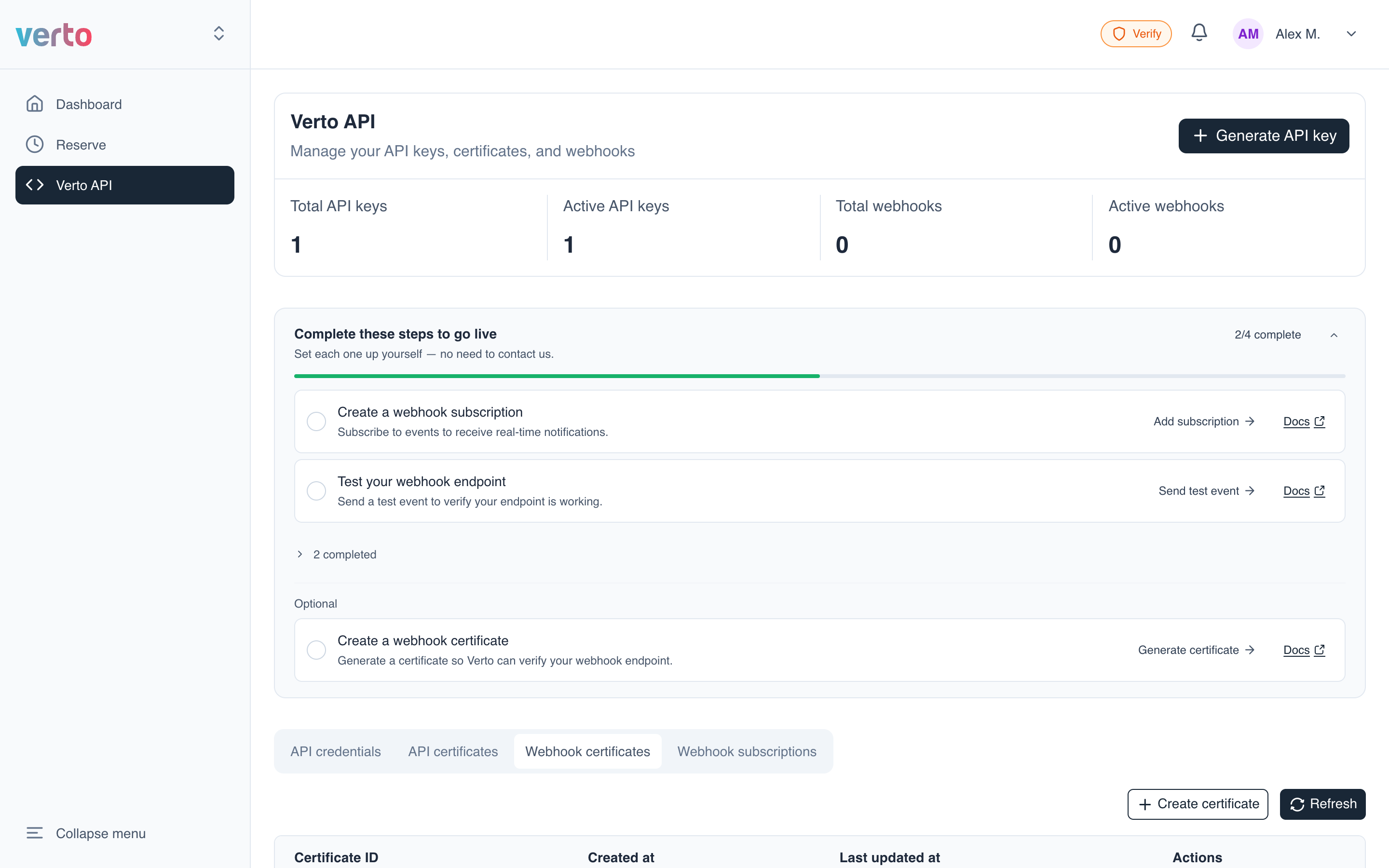
Go-live checklist for webhooks
| Step | Required? | Guide |
|---|---|---|
| Create a webhook certificate | Optional | Webhook certificates |
| Create a webhook subscription | Required | Create a webhook subscription |
| Test your webhook endpoint | Required | Send a test event |
When every required step is done, the card changes to "You're live" and folds away. Click the chevron to open it again.
Read-only membersYou can still click every step to jump to the right place. Steps that need write access show View and the hint "Needs developer write access — ask an admin to finish this one."
In this guide
Updated 14 days ago